

Step Size Warnings
When a marcher’s step size exceeds the field’s warning threshold, OpenMarch draws that pathway in red (dashed) so you can spot over-threshold transitions. These are step size warnings, not errors.
Editing the threshold
Section titled “Editing the threshold”The warning threshold lives on the field, not in the View tab.
- Open the field picker (field icon) and click Customize.
- On the General tab, find Step Size Warning Threshold.
- Enter the maximum step distance you want before a pathway is flagged (inches or centimeters, matching your field’s measurement system).
Marchers whose step size exceeds this distance get a warning-colored path. Set the threshold to 0 to disable the warning calculation entirely.
For more on field settings, see Editing the Field.
Turning off the red lines
Section titled “Turning off the red lines”- Open the View tab in the toolbar.
- Click Step size warnings to toggle them off (eye slash).
This control sits next to Previous Paths and Next Paths and uses the same eye / eye-slash pattern. Your choice is saved and persists across reloads.
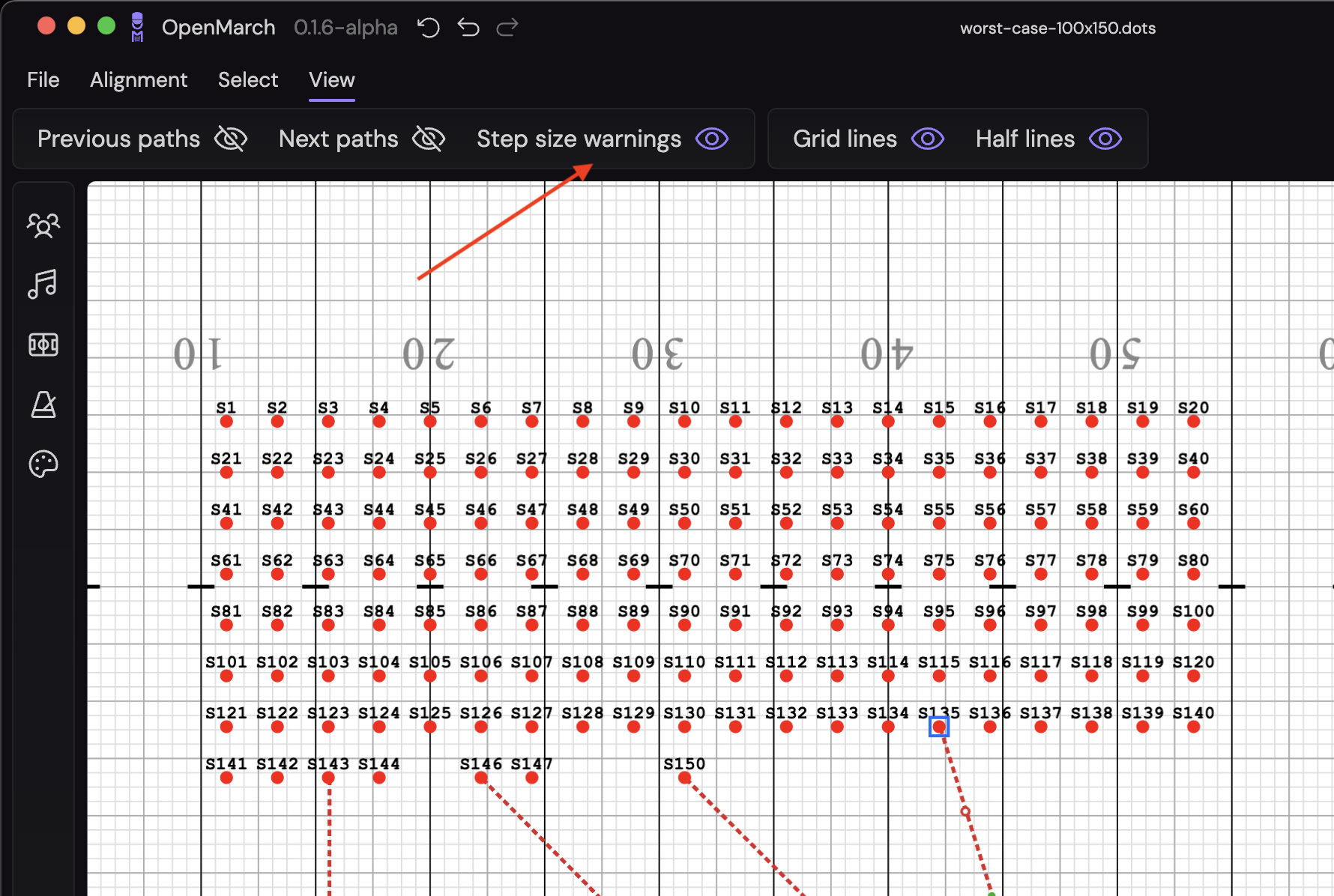
With warnings off:
- Over-threshold paths no longer force-show in red.
- Pathways follow normal Previous Paths / Next Paths visibility.
- Visible pathways use normal (non-red) styling.